
Blog
Compliance Check
February 21, 2026
New Feature: Compliance Check
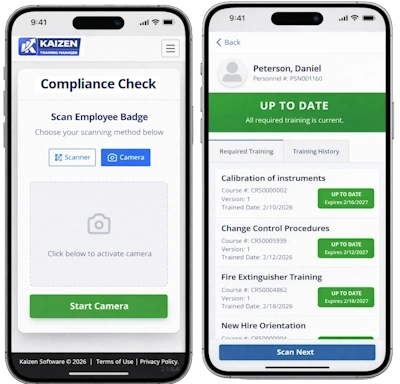
The new Compliance Check feature gives authorized users a full view of an employee's training compliance with a quick scan of their badge or by entering their personnel number. No need to run a full report to see if an employee is up to date on their training or if they have any overdue training.
What It Shows
Select an employee and immediately see a list of their required training with a color-coded status for each item:
- Up To Date: Training is current
- Expiring Soon: Training is current but will expire within the warning period
- Overdue: Training is past due or has expired
- Untrained: Required training has not yet been completed
Key Benefits
- Quickly verify an employee's compliance before a job, audit, or inspection
- Identify training gaps at a glance—no report needed
- Available directly from the Home/Dashboard page
Scanning an Employee Badge
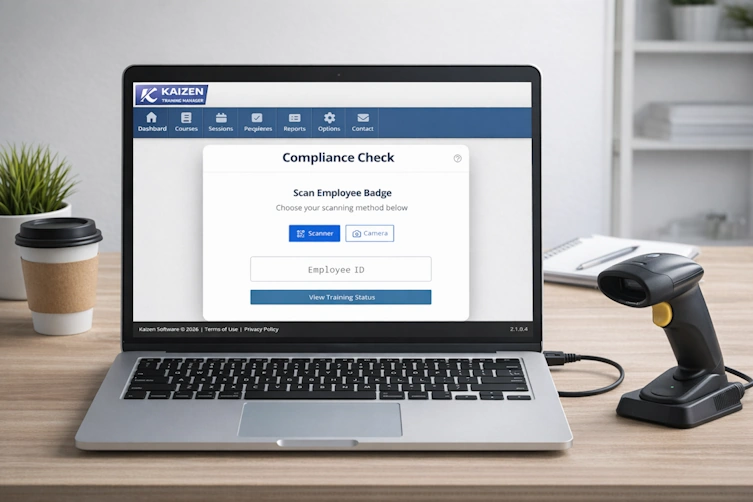
Looking up an employee is even faster with badge scanning. On the Home/Dashboard page, click the Compliance Check button and then scan the employee's badge—no need to manually search for their name. Two scanning methods are supported:
- Phone camera: Use your phone's built-in camera to scan the barcode on the employee's badge.
- Wired scanner: Plug in a USB barcode scanner and scan the badge directly.
Learn More
For full details and step-by-step instructions, see the Compliance Check User Guide .